Doom in the terminal
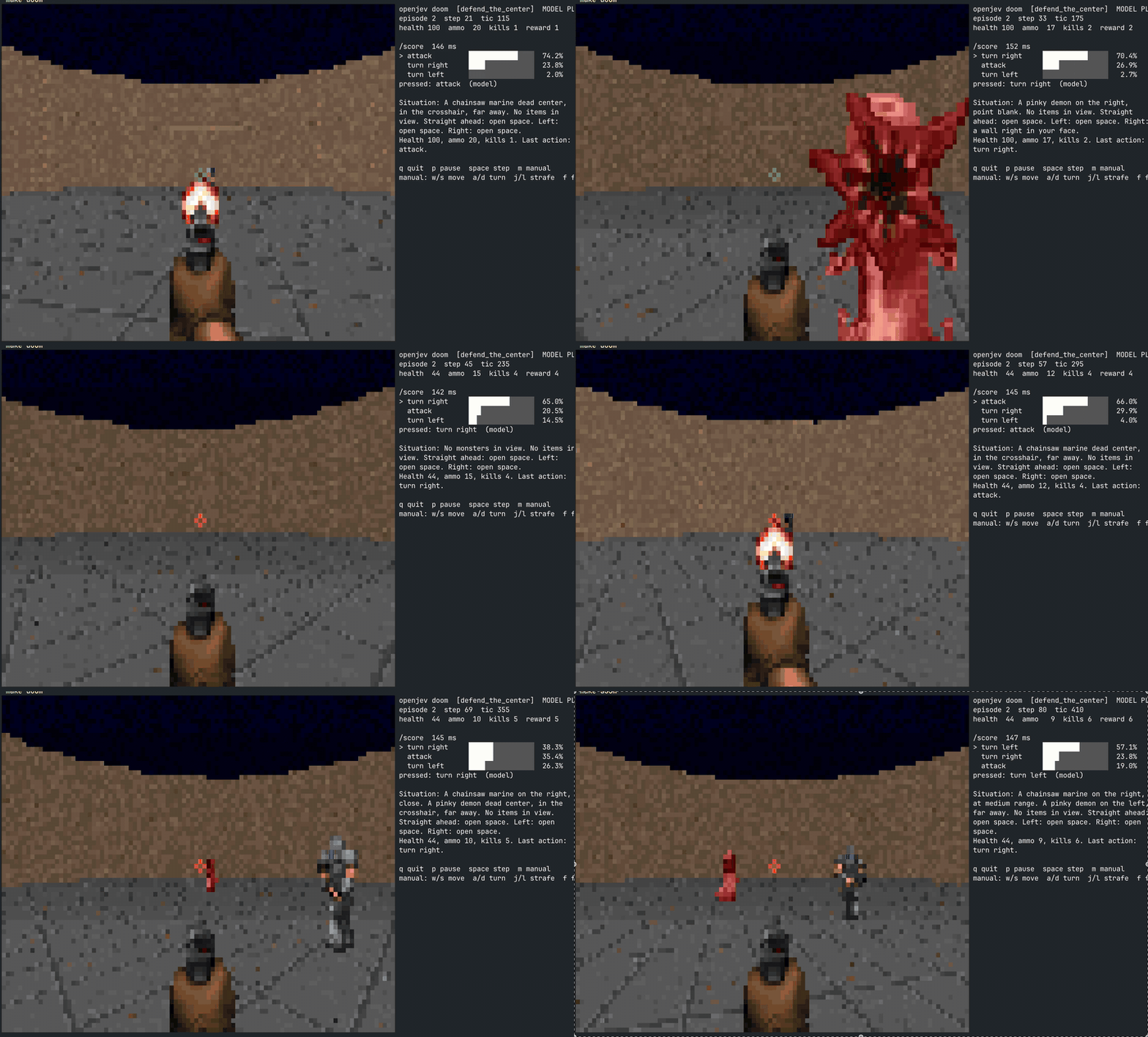
demo/doom/ runs ViZDoom headless, describes each frame in a line of text, and
lets the server rank the action menu with one /score call (or one System One
choice question). Nothing is generated: one prefill per decision, one padded
forward pass over the menu, argmax, press the keys, repeat.
(Full-resolution recording: doom-recording.mov.)
ViZDoom frame ──> labels + depth buffer ──> "A zombie on the left, close. ..."
                                                  │
        press keys for N tics  <── argmax <── POST /score (or /v1/systemone)
The frame is drawn in the terminal with 24-bit half-block characters. The right-hand panel shows the option probabilities the server returned, the action pressed, the latency, and the situation text the model read.
Run it
make setup            # create the environment and download the model
uv sync --extra torch --extra doom  # install ViZDoom for the demo
make serve            # terminal 1: load the model once
make doom             # terminal 2: model plays defend_the_center
Or drive play.py directly:
.venv/bin/python demo/doom/play.py                                   # defend_the_center via /score
.venv/bin/python demo/doom/play.py --scenario deadly_corridor        # harder
.venv/bin/python demo/doom/play.py --api systemone --api-key local   # System One choice question
.venv/bin/python demo/doom/play.py --temperature 0.7 --record run.jsonl
.venv/bin/python demo/doom/play.py --manual                          # you drive, the panel shows what the model would do
make doom variables
The doom target defaults to SCENARIO=defend_the_center and API=score
and passes them through to play.py. Override them on the command line,
e.g. make doom SCENARIO=deadly_corridor API=systemone. API_KEY
defaults to local.
Keys while it runs
| key | effect |
|---|---|
q |
quit |
p |
pause / resume |
space |
single step while paused |
m |
toggle manual control (model still ranks each step) |
w s |
move forward / backward (manual) |
a d |
turn left / right (manual) |
j l |
strafe left / right (manual) |
f |
fire (manual) |
Scenarios
--scenario accepts defend_the_center (the default), deadly_corridor,
basic, health_gathering, and level.
The first four are small research arenas that ship with ViZDoom. level loads
an actual level — map01 of the bundled freedoom2.wad by default. If you own
Doom or Doom II, point at the real data:
.venv/bin/python demo/doom/play.py --wad ~/games/doom2.wad --map map01
.venv/bin/python demo/doom/play.py --wad ~/games/doom.wad  --map e1m1
--wad or --map implies --scenario level.
How the decision is made
describe.py turns the ViZDoom labels buffer (which actors are on screen and
where) and the depth buffer (how far the walls are) into one line of text, for
example:
Situation: A chainsaw marine slightly left of center, close. No items in view.
Straight ahead: open space. Left: open space. Right: open space.
Health 100, ammo 26, kills 0. Last action: turn right.
->
With --api score the context is the scenario goal, a few rules of thumb, a
handful of worked Situation -> action examples, and the live situation. The
menu (" attack", " turn left", " turn right") is scored as the
continuation after ->.
With --api systemone the same observation is sent as a structured state
object with one choice question whose criteria are the actions; the server
renders its own prompt and returns choice, probabilities and confidence.
Two details that matter for a scorer
- Options carry their own leading space. Sending
sep=" "makes the tokenizer emit a lone space token, which never occurs mid-sentence in training data. Every option then scores around -20 nats and the ranking is noise. - The examples do the work. Without them a 4B base model has a fixed prior (always turn, or always attack once the menu is in the prompt). With five examples the ranking tracks where the monster is. This is Route B from the design notes: plausible-as-continuation is the signal, and the prompt shapes it.
Recording runs
--record writes one JSON line per decision (context, options,
probabilities, action, source, reward), which is the jevlike training
format if you want to go from Route B to Route A later.
Files
| file | contents |
|---|---|
demo/doom/play.py |
loop, keyboard, CLI |
demo/doom/game.py |
ViZDoom setup, action vocabulary, per-scenario menus, rules and examples |
demo/doom/describe.py |
snapshot to text / structured state |
demo/doom/client.py |
/score and /v1/systemone calls (standard library only) |
demo/doom/render.py |
ANSI half-block frame and panel |